



Meet your AI trading companion.
Best-in-class indicators MEETS lightning-fast autonomous execution.
API key and MCP on every plan








Agent-native MCP, full tool access
Your AI gets the same tools you do — it studies the market, builds strategies and saves them to your account.
Research signals · backtest · automate
Research proprietary signals, backtest strategies with fees and exits, then automate execution — all in one terminal.
2000 markets plus 28 traders
Liquidation levels, orderbook, slippage and global account positioning, built in-house from raw exchange data.
Trading Labs · backtest
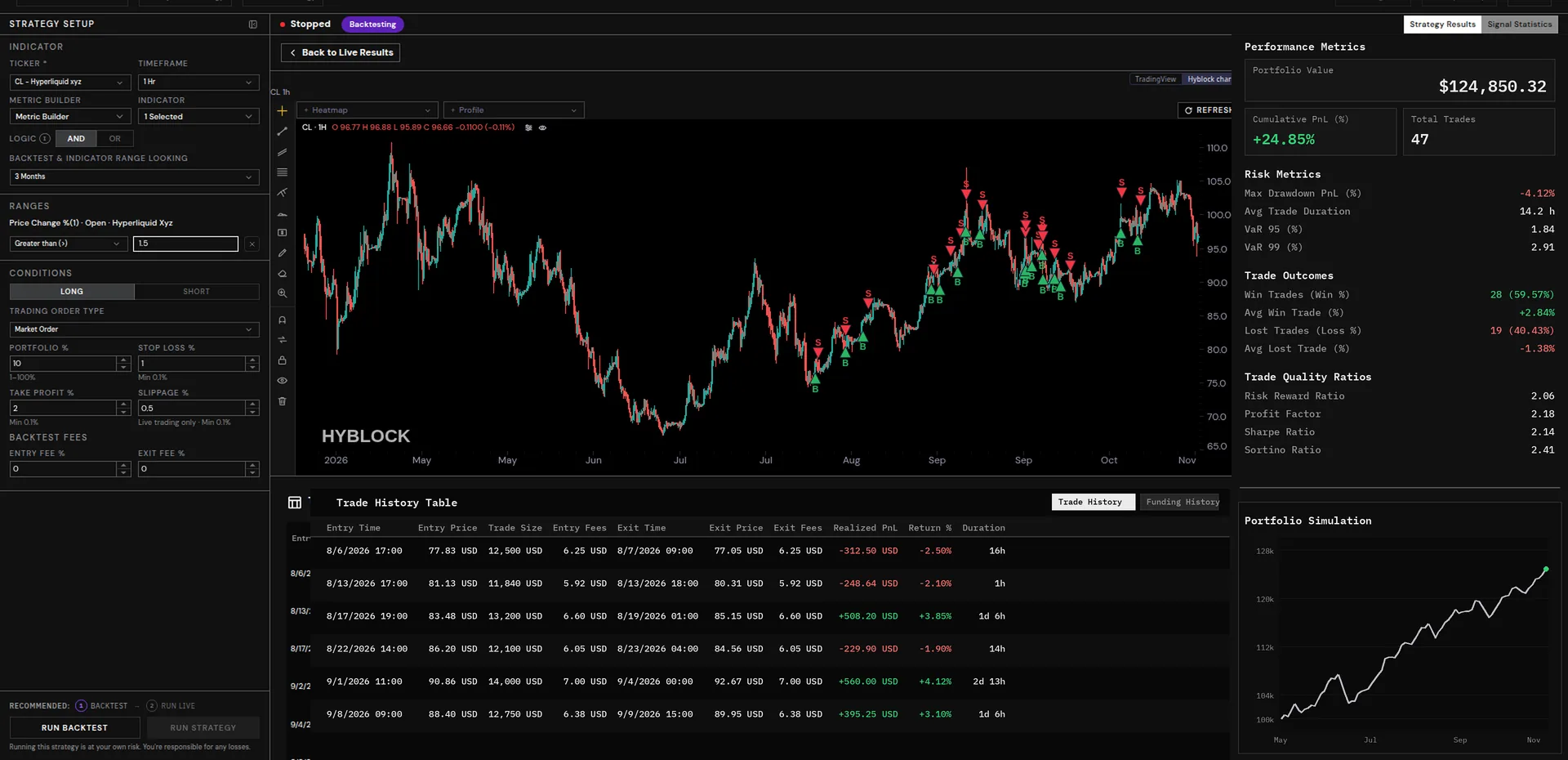
One strategy, start to finish, in plain English.
A screen, a liquidity check, a backtest, a save and an activation — the same five calls your AI makes through the Hyblock MCP, laid out as a conversation.
~ /ask
hyblock · ask
> Scan every coin. Which has the highest share of accounts long?
→ Scanning global account positioning across 700+ coins…
→ Ranking by long share, highest to lowest…
GOOGL
93.39%
INTC
92.07%
XAG
91.2%
BTC
70.08%
Real rank: global accounts long, Binance, 1h (Nov 2026 MCP session) · share of accounts long
Connect Hyblock to Claude, ChatGPT, Cursor or Codex over MCP, and your AI runs this same flow for you.
binance ·
bybit ·
okx ·
bitget ·
coinbase ·
hyperliquid ·
lighter ·
deribit ·
bitfinex ·
bitmex ·
gemini ·
htx ·
phemex ·
binance ·
bybit ·
okx ·
bitget ·
coinbase ·
hyperliquid ·
lighter ·
deribit ·
bitfinex ·
bitmex ·
gemini ·
htx ·
phemex ·
Built in-house from raw exchange data.
The analytics Hyblock is known for, across crypto perps, spot and real-world assets. Every family comes per exchange or aggregated, with transforms like RSI, EMA and percentile on top.
2,000+
Active markets20+
Exchanges100+
EndpointsMajor proprietary set
01
Liquidation levels
02
Liquidation heatmap
03
Orderbook depth
04
Slippage
05
Open interest
06
Funding
07
Global positioning
08
Market Imbalance Index
09
Whale Position Dominance
10
Squeeze Intensity
Terminal · saved console
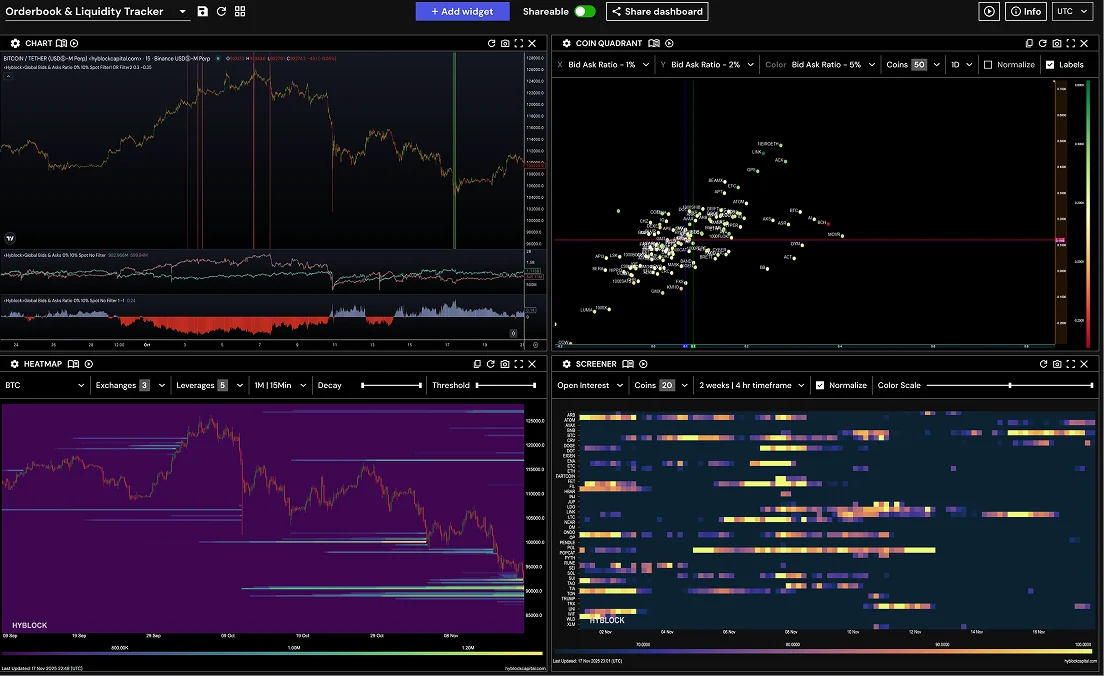
Find signals. Build strategies. Automate execution.
The Hyblock trading terminal is built for sophisticated desks — research proprietary signals, shape strategies with real fees and exits, then automate execution without leaving the workspace.
Research signals
Hunt liquidations, positioning and proprietary indexes across 2,000+ markets — then pin the setups that matter.
Build strategies
Layer conditions, exits and fees in the terminal. Backtest variants until the edge is honest.
Automate execution
Promote a strategy to live automation on Hyperliquid and monitor the book from the same desk.
AI works with you in the console.
You don't need to learn how to build a terminal layout. Work it out with your AI in Cursor or Claude, then ask it to save the console to Hyblock. The terminal is where your AI's work shows up.
01
Describe it. Tell your AI the workspace you want: a BTC chart, a funding screener and a liquidation heatmap.
02
It builds it. Your AI picks the widgets, coins and indicators from the toolset it already understands.
03
Ask it to save. “Save this console to Hyblock.” It is saved to your account under the name you give it.
04
Open it. The console is on your Terminal at /console, ready to reload, rearrange or share.
~/.cursor/mcp.json
Remote MCP · OAuth
{
  "mcpServers": {
    "hyblock": { "url": "https://hyblockcapital.com/api/mcp" }
  }
}
Sign in with your Hyblock account. No API key goes in the prompt.
An API key on every plan.
Build your own tools, bots and apps on the same 100+ endpoints behind the terminal. The API key comes with the terminal, backtesting, execution and MCP in the same subscription.
Basic
10 days
10 days
Advanced
90 days
365 days
Professional
365 days
3 years
GET /v2/liquidationLevels
REST · JSON
# request, as documented in the API reference
curl 'https://api.hyblockcapital.com/v2/liquidationLevels?coin=BTC&exchange=binance_perp_stable&leverage=all&position=all' \
  --header 'x-api-key: <your-key>'

# response fields
data[]     creationDate · leverage · openDuration · price · side · size · timestamp
metadata   exchanges · unsupportedExchanges
$ curl https://api.hyblockcapital.com/v2/ping
200
success
public health check
Add Hyblock to your trading today.
2,000+ markets, 20+ exchanges, one terminal and one MCP. Start free and connect your AI today.


Support
Community
FAQ
Contact Us